GUI.tooltip
Описание
Всплывающая подсказка элемента управления, над которым в данный момент находится мышь или который находится в фокусе клавиатуры. (Только чтение).
При создании элементов управления с графическим интерфейсом можно передать для них всплывающую подсказку. Это делается путем изменения параметра содержимого для получения пользовательского объекта GUIContent, а не просто передачи строки для отображения.
Когда мышь находится над элементом управления с всплывающей подсказкой, глобальное значение GUI.tooltip задается подсказкой, которую вы передаете. Если мышь не находится над любой элемент управления, значение устанавливается для элемента управления, который имеет фокус клавиатуры. В конце кода OnGUI вы можете сделать метку, показывающую значение GUI.tooltip
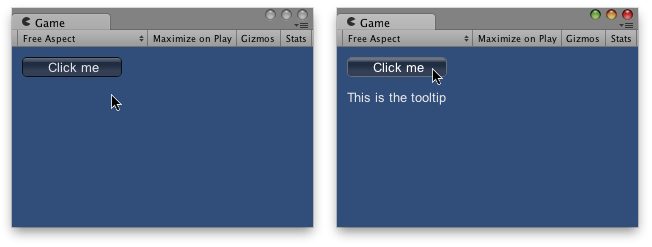
using UnityEngine;
using System.Collections;

public class ExampleClass : MonoBehaviour
{
    void OnGUI()
    {
        // Make a button using a custom GUIContent parameter to pass in the tooltip.
        GUI.Button(new Rect(10, 10, 100, 20), new GUIContent("Click me", "This is the tooltip"));

        // Display the tooltip from the element that has mouseover or keyboard focus
        GUI.Label(new Rect(10, 40, 100, 40), GUI.tooltip);
    }
}
You can use the ordering of elements to create 'hierarchical' tooltips:
using UnityEngine;
using System.Collections;

public class ExampleClass : MonoBehaviour
{
    void OnGUI()
    {
        // This box is larger than many elements following it, and it has a tooltip.
        GUI.Box(new Rect(5, 35, 110, 75), new GUIContent("Box", "this box has a tooltip"));

        // This button is inside the box, but has no tooltip so it does not
        // override the box's tooltip.
        GUI.Button(new Rect(10, 55, 100, 20), "No tooltip here");

        // This button is inside the box, and HAS a tooltip so it overrides
        // the tooltip from the box.
        GUI.Button(new Rect(10, 80, 100, 20), new GUIContent("I have a tooltip", "The button overrides the box"));

        // finally, display the tooltip from the element that has
        // mouseover or keyboard focus
        GUI.Label(new Rect(10, 40, 100, 40), GUI.tooltip);
    }
}
Tooltips can also be used to implement an OnMouseOver / OnMouseOut messaging system:
using UnityEngine;
using System.Collections;

public class ExampleClass : MonoBehaviour
{
    public string lastTooltip = " ";

    void OnGUI()
    {
        GUILayout.Button(new GUIContent("Play Game", "Button1"));
        GUILayout.Button(new GUIContent("Quit", "Button2"));

        if (Event.current.type == EventType.Repaint && GUI.tooltip != lastTooltip)
        {
            if (lastTooltip != "")
            {
                SendMessage(lastTooltip + "OnMouseOut", SendMessageOptions.DontRequireReceiver);
            }

            if (GUI.tooltip != "")
            {
                SendMessage(GUI.tooltip + "OnMouseOver", SendMessageOptions.DontRequireReceiver);
            }

            lastTooltip = GUI.tooltip;
        }
    }

    void Button1OnMouseOver()
    {
        Debug.Log("Play game got focus");
    }

    void Button2OnMouseOut()
    {
        Debug.Log("Quit lost focus");
    }
}Обновлено 17 ноября 2026 г.